

Pm studio logomark whiteNo-code modeling environment

PM Studio™: no-code modeling, built by your operators.

Your team builds predictive models from its own history, reviews them offline, then deploys to a live dashboard in hours. Every new lab value retrains the model, which feeds PM Vector setpoints and recommendations.

Watch the PM Studio overview0:30 · sound on
Read the transcript

Most process models start aging the day they ship. Built once. One grade. Never retrained. PM Studio hands the model to your engineers. Pick the quality tag; it tests hundreds of approaches on your history. No code. Deploy it to your operators’ dashboard. Every new lab value retrains it. So the model your team built is still right at the next grade change.

Inside PM Studio

3 stages from historian to live model

A lab result takes 30 to 60 minutes and describes material that has already left the machine. PM Studio’s only inputs are your process data and your quality targets. No code, no hand-tuning.

01 / Model creation

Your engineer builds it. No code.

Your engineer picks the quality tag. PM Studio tests hundreds of modeling approaches and keeps the best fit.

How model creation works, step by step

PM Studio tests hundreds of approaches against your history and selects the best performer for your equipment and product mix.

  • Best fit selected per machine and per grade/SKU
  • Data cleaning and gap-filling handled by the platform
  • Grade-specific limits, from a handful of grades to 40 or more
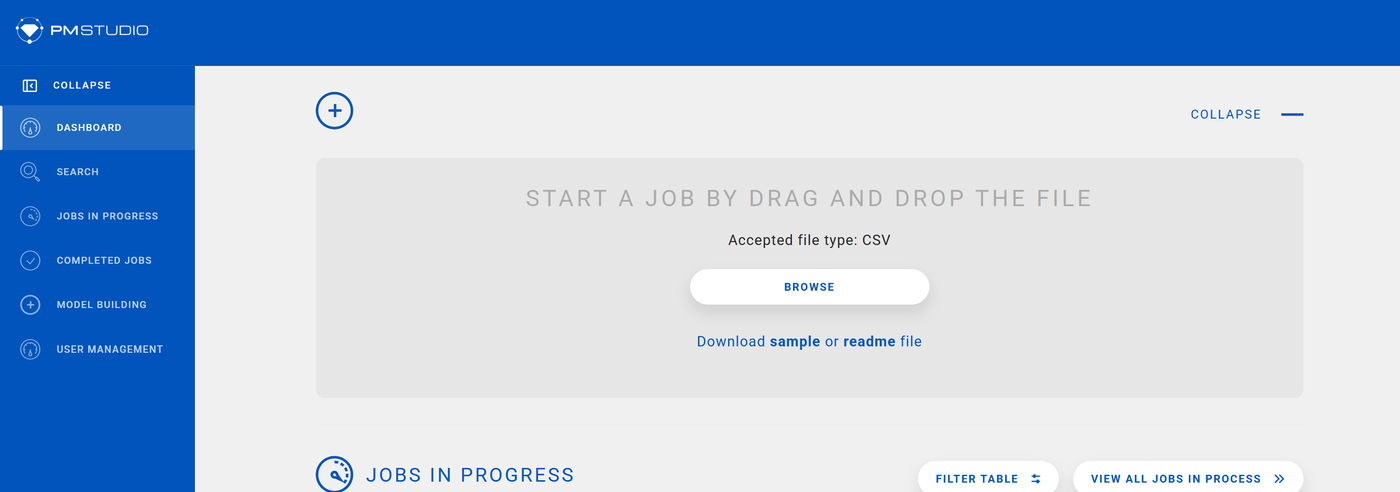
PM Studio dashboard showing the drag-and-drop CSV upload screen operators use to start a new model-building job, with a list of jobs in progress below

The no-code model-building screen

02 / Live deployment

A prediction every 30 seconds

The model runs continuously, showing operators where a quality metric is heading between lab samples.

How live deployment works, step by step

Operators see the trend early enough to correct, across multiple parameters, with grade and SKU transitions handled automatically.

  • Predictions every 30 seconds; recommendations every 15 minutes, only when out of bounds
  • Transition logic adjusts the model as products change
  • Read-only by default: nothing writes to a controller until you authorize it
LAB SAMPLE 30–60 minutes apart PM STUDIO PREDICTION Every 30 seconds, continuously

Lab cadence vs. prediction cadence

03 / Continuous retraining

Every lab value makes it sharper

Each new lab result retrains the model automatically, with no scheduled rebuild.

How continuous retraining works, step by step

Each new lab result is fed back as ground truth and the model retrains. When a different approach starts outperforming, PM Studio switches.

  • Retrains on every new lab value
  • Re-selects the method when live performance degrades
  • Absorbs seasonal, furnish and raw-material shifts
New lab value Ground truth in Retrain Fit against the new point Re-select method If a better fit wins Live prediction Every 30 seconds

The retraining loop

Getting started

Runs on what you already have.

ProcessMiner sits beside the systems you already run. It reads from your historian and writes nothing back until you say so.

No GPU, no new data pipeline, no historian migration, and nothing written to a controller until you authorize it.

One server, anywhere

Runs on a standard CPU server, no GPU, in the cloud, a private cloud or entirely inside your network. Process data never trains our models.

Historian-agnostic

Connects to AVEVA PI, OSI PI, SCADA and other major platforms by API or a lightweight on-premises agent.

Only the tags it needs

Process and quality tags chosen with your engineers: roughly 200 on a wastewater process, 2,000–4,000 on a paper machine. Never personnel data.

~30 min*
to connect your historian
Hours*
to a first live model
As fast as 2 weeks*
to full deployment

*Best case. The ~30-minute connection assumes your data is ready and your team has completed the preparation work. Timing depends on your data readiness, which the free Process Data Assessment confirms before anything is committed.

25%
Less chemistry
Reduced wet-strength dosage
23%
Reduced quality variation
Tighter, consistent quality
~$1M
Cumulative savings
Over 12 months, one machine

Results from a single paper-machine deployment, measured against a baseline agreed with the mill in advance. Results vary by facility, process and data quality; past performance is not a guarantee of future results.

Free Process Data Assessment

See your own data come to life in hours.

Start with a free Process Data Assessment. We’ll take a closer look and let you know exactly what your own data can do.

Needs read access, 6–12 months of history and a process lead’s time. Nothing writes to a controller until you authorize it. Prefer to start with a pilot instead? Email us

Questions, answered

Frequently asked questions

What is PM Studio?
PM Studio is the no-code, adaptive modeling environment behind the ProcessMiner platform. Your team uploads its own historical data, builds and reviews grade or SKU-specific predictive models offline, then deploys them to a live dashboard in hours, no code required. Every model auto-selects the best-performing method, retrains on every new lab value, and deploys live, feeding the rest of the platform: Real-Time Prediction, root cause analysis, PM Vector setpoints and recommendations.
What data does PM Studio need to build a model?
Read access to your process historian (AVEVA PI, OSI PI, SCADA or similar), roughly 6–12 months of history for each quality metric you want predicted, and your quality targets and grade or SKU definitions. Data cleaning, gap-filling and outlier screening are handled by the platform, not by your engineers.
How long does it take to get a live model?
The historian connection typically takes about 30 minutes when your data is ready and your team has completed the preparation work; a first live model follows within hours, and a full deployment can be complete in as fast as 2 weeks.
Do we need a data science team to use PM Studio?
Not to get started. PM Studio is a no-code environment: your own process or quality engineer builds the model directly, by selecting a target tag rather than writing code. From there PM Studio tests hundreds of modeling approaches against your history automatically and selects the best-performing one per machine and per grade, then retrains it on every new lab value.
Does PM Studio write to our control system?
Not by default. The platform reads from your historian and writes nothing to a controller until closed-loop control is explicitly authorized and scoped by you, inside limits your team sets. Most deployments start with monitoring and prediction only, where the operator decides every time. See autonomous optimization for the full adoption path.
How many product grades or SKUs can PM Studio manage?
PM Studio holds grade-specific upper, lower and target limits and handles transitions automatically as the active product changes, from a handful of grades to 40 or more, without manual reconfiguration between runs.

How PM Studio differs from PM AI Agent is answered on the Platform page.

Get in touch

Have a question?

Whether it's our platform, your process, or a free Process Data Assessment you'd like to start, let us know.

Rather talk? Call +1 (470) 910-0770.

This field is for validation purposes and should be left unchanged.